025.猜數字Guess the number
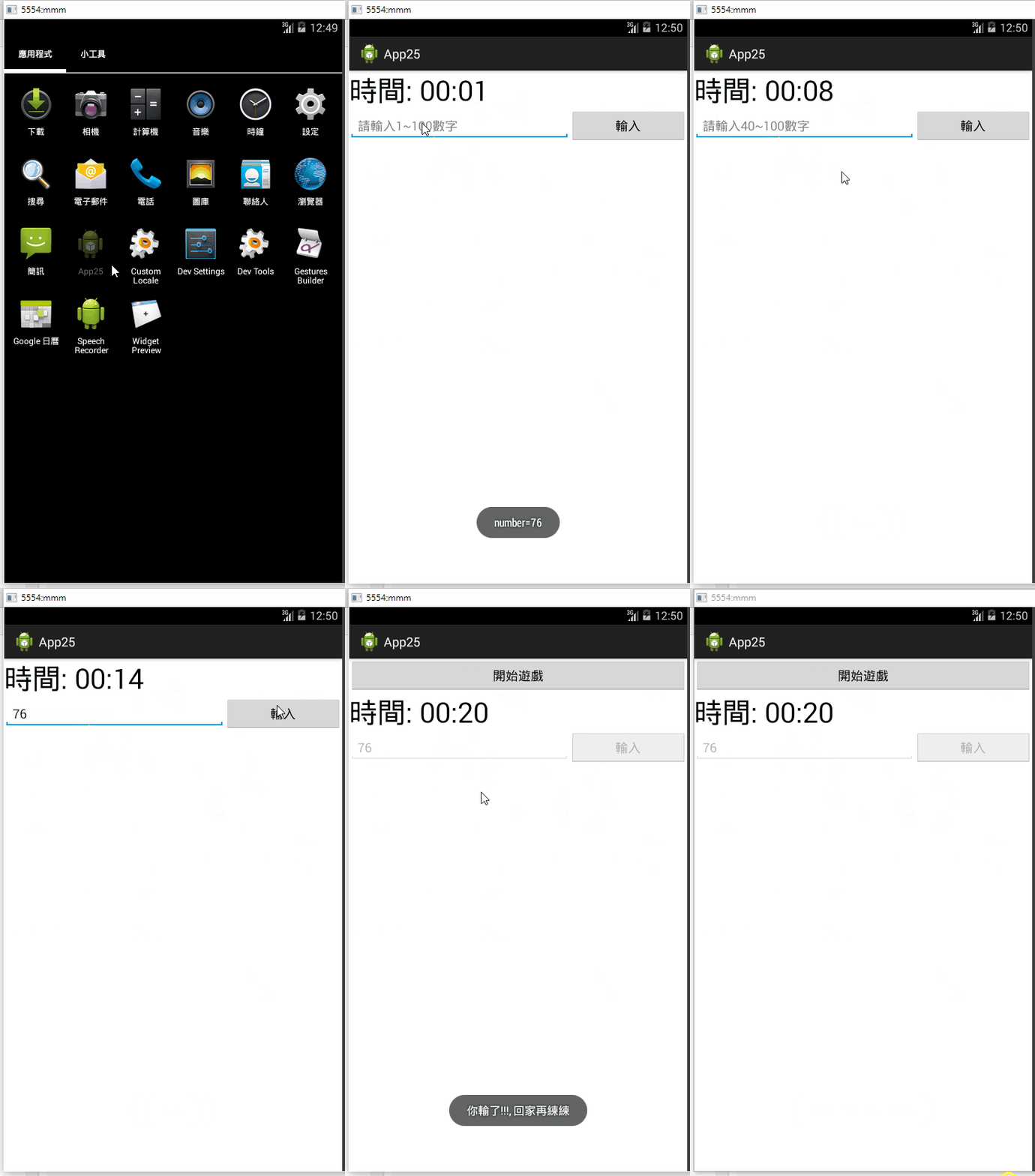
<LinearLayout xmlns:android="http://schemas.android.com/apk/res/android"
    xmlns:tools="http://schemas.android.com/tools"
    android:id="@+id/LinearLayout1"
    android:layout_width="match_parent"
    android:layout_height="match_parent"
    android:orientation="vertical"
    tools:context="${relativePackage}.${activityClass}" >

    <Button
        android:id="@+id/button1"
        android:layout_width="match_parent"
        android:layout_height="wrap_content"
        android:onClick="doStart"
        android:text="開始遊戲" />

    <Chronometer
        android:id="@+id/chronometer1"
        android:layout_width="wrap_content"
        android:layout_height="wrap_content"
        android:format="時間: %s"
        android:text="Chronometer"
        android:textSize="40sp" />

    <LinearLayout
        android:layout_width="match_parent"
        android:layout_height="wrap_content" >

        <EditText
            android:id="@+id/editText1"
            android:layout_width="wrap_content"
            android:layout_height="wrap_content"
            android:layout_weight="1"
            android:ems="10"
            android:hint="請輸入1~100數字"
            android:inputType="number" >

            <requestFocus />
        </EditText>

        <Button
            android:id="@+id/button2"
            android:layout_width="wrap_content"
            android:layout_height="wrap_content"
            android:layout_weight="1"
            android:onClick="doGuess"
            android:text="輸入" />
    </LinearLayout>

</LinearLayout>
package com.example.app25;
import android.app.Activity;
import android.media.MediaPlayer;
import android.os.Bundle;
import android.os.SystemClock;
import android.view.View;
import android.widget.Button;
import android.widget.Chronometer;
import android.widget.EditText;
import android.widget.Toast;
public class MainActivity extends Activity {
EditText editText;
Chronometer chronometer;
Button b1, b2;
int number;
MediaPlayer player;
int r1, r2;
@Override
protected void onCreate(Bundle savedInstanceState) {
super.onCreate(savedInstanceState);
setContentView(R.layout.activity_main);
editText = (EditText) this.findViewById(R.id.editText1);
chronometer = (Chronometer) this.findViewById(R.id.chronometer1);
b1 = (Button) this.findViewById(R.id.button1);
b2 = (Button) this.findViewById(R.id.button2);
player = MediaPlayer.create(this, R.raw.clock);
chronometer
.setOnChronometerTickListener(new Chronometer.OnChronometerTickListener() {
@Override
public void onChronometerTick(Chronometer chronometer) {
long secs = (SystemClock.elapsedRealtime() - chronometer.getBase()) / 1000;
if (secs >= 20) {
player.start();
chronometer.stop();
updateUI(false);
Toast.makeText(MainActivity.this, "你輸了!!!, 回家再練練", Toast.LENGTH_SHORT).show();
} else if (secs != 0 && secs % 10 == 0)
{
player.start();
}
}
});
updateUI(false);
}
public void doStart(View view) {
updateUI(true);
number = (int) (Math.random() * 100 + 1);
r1 = 1;
r2 = 100;
chronometer.setBase(SystemClock.elapsedRealtime());
chronometer.start();
Toast.makeText(this, "number=" + number, Toast.LENGTH_SHORT).show();
}
public void doGuess(View view) {
String text = editText.getText().toString();
int guess = Integer.parseInt(text);
if (guess == number) {
Toast.makeText(this, "答對了, 獲得手機一隻", Toast.LENGTH_SHORT).show();
} else if (guess < number) {
Toast.makeText(this, "太小", Toast.LENGTH_SHORT).show();
if (r1 < guess)
r1 = guess;
editText.setText("");
} else {
Toast.makeText(this, "太大", Toast.LENGTH_SHORT).show();
if (r2 > guess)
r2 = guess;
editText.setText("");
}
editText.setHint(String.format("請輸入%d~%d數字", r1, r2));
}
public void updateUI(boolean flag) {
b1.setVisibility(flag ? View.GONE : View.VISIBLE);
b2.setEnabled(flag);
editText.setEnabled(flag);
}
}